Email setup and getting into inboxes
The address you send from, the footer the law asks for, and what decides whether you land in spam.
Email is one of your channels, not a separate tool. It carries the same conversation as your website chat and the other channels, so this page is about the sending side of it. See Your channels for how the channels fit together.
The three things at the bottom of every email
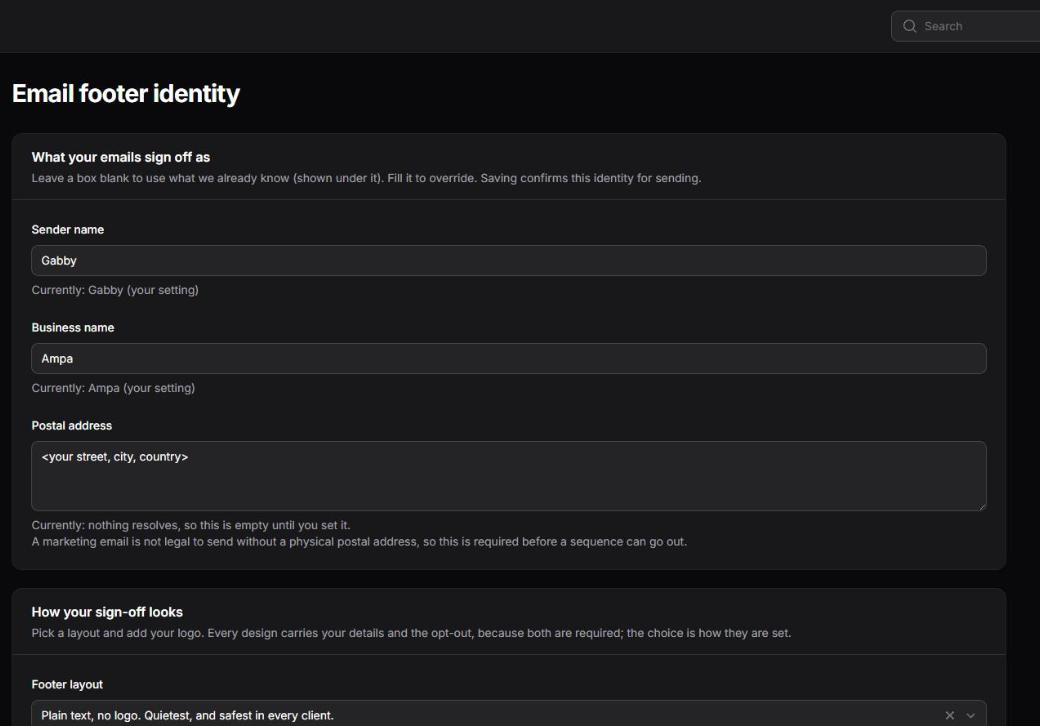
Every message your agent sends signs off with a sender name, your business name and a postal address. That is not decoration. A marketing email without a physical address is not legal to send in most of the markets you sell to, and a message with no identifiable sender reads as machine generated to a person and as bulk to a spam filter.
Set them in the console under Settings, then Brand and email design. Saving that form is also how you confirm the identity is real. Until you do, marketing sends are held rather than sent with a placeholder. The same screen holds your brand colour and your letterhead (website, phone, a tagline), so how every email looks is set in one place.
How the sign-off looks
On the same screen you choose one of four footer layouts, upload your logo, and see a live preview of the whole email, drawn by the same code that sends it.
- Plain is text only, under a hairline rule. It is the safest choice and the one that survives every email client ever written.
- Logo on the left puts your mark beside your details.
- Logo on top centres the mark above them.
- Card sets the whole footer in a tinted panel edged in your brand colour.
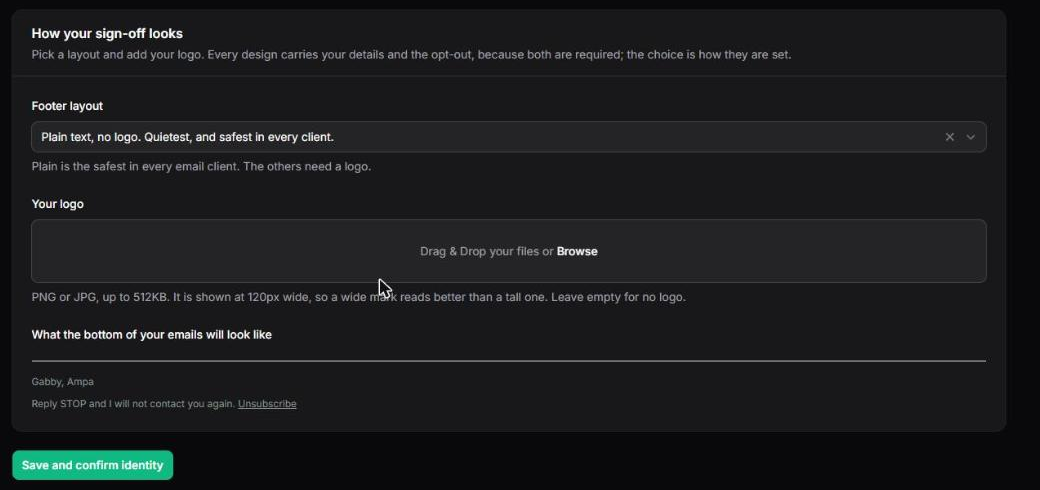
A preview under the choices shows the real thing, rendered by the same code that renders the email, so what you see is what the person receives.
Two things are worth knowing. If you pick a layout that shows a logo and have not uploaded one, you get the plain layout rather than an empty box, because a gap where a mark should be reads as broken. And whichever layout you choose, your business details and the opt-out line are always there. The choice is how they are set, never whether they appear. That is what keeps a design menu from quietly becoming a legal problem.
Which design each email wears
On the same screen you pick the design each kind of email wears. Replies and follow-ups have three shells: a card, a plain letter, or a banner in your colour. The emails in a sequence come in two designs each. Left alone, Ampa shows both and counts which one people act on, and you can fix one if you prefer. Every design carries the same words, your sign-off and the opt-out. A design is how the email looks, never what it says, and you see each one drawn with sample words before you choose.
Subject lines
The first email on a conversation is titled after whatever the person actually asked about. If they were looking at a particular product, the subject names it. If your business does not sell from a list, it uses the opening line set for your trade.
Replies keep the same subject on purpose. A subject that changes halfway through splits the conversation into two threads in the recipient's mailbox, and half your reply history disappears from view.
If you have no postal address you are willing to publish, a mailbox address or a registered office address is normal and acceptable. What is not acceptable is leaving the sample text in place, and your readiness screen will stay red until it is gone.
The address you send from
We set up a sending address on a subdomain for you, so your main domain's reputation is never at risk from a sending mistake. Replies come back to an address you choose, which can be your normal inbox.
Why some mail lands in spam
Three records on your domain decide most of it: SPF, DKIM and DMARC. We configure them with you at setup, and we check them rather than assume them. If briefs or replies start landing in spam, tell us and we will re-check them, since the answer is usually a DNS change somewhere else that quietly broke one of the three.
Beyond the records, the things that hurt are volume you did not build up to, and people marking messages as unwanted. Ampa protects you from the second one on purpose.
Unsubscribes are absolute
Every marketing message carries an unsubscribe link, and the big mailbox providers get a one click version of it too. Anyone who unsubscribes, replies with "stop", or says in plain words that they are not interested, is suppressed immediately and permanently for your business.
Nothing can send around that. There is one door for outgoing mail, and the suppression list is checked inside it, so no feature we build later can accidentally step over it.
Cadence
Your agent never replies to an email faster than a person plausibly could, and never sends outside business hours. A reply that arrives in four seconds at three in the morning tells the reader they are talking to a machine, which costs you the trust the rest of the product is buying.
Your own team never receives follow-ups. An address that has a login to your console gets the reply it is testing for and nothing more: follow-up steps and marketing mail go only to real prospects. So test freely with your own address, and do not expect the drip.