Setup, the six steps
Six checks that decide whether your agent is genuinely ready to meet a customer.
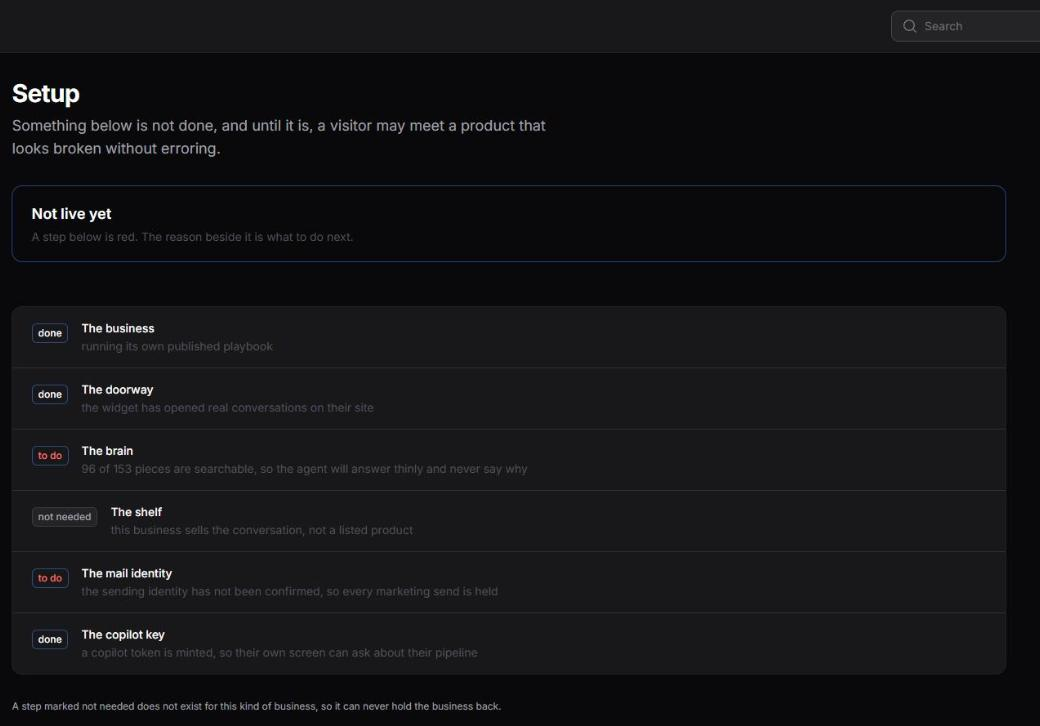
Open Setup in your console. Each step is green, red, or marked as not applying to your kind of business. Every red one tells you what is wrong in plain words. When they are all green, you are live.
There is no skip button, on purpose. A skipped step stays red forever, and "mostly ready" is not a thing a customer experiences.
The business
Your business exists, has a niche, and your agent has a name. If your playbook is still the generic template for your industry, this stays green and says so, because running on the template is a legitimate way to start and something you should know you are doing.
The doorway
The widget is really on your site and really working. This does not check that a script tag exists somewhere, it checks that a real conversation has started through your key. That proves the key, the address list and the connection all at once. It also fails if no site addresses are listed, because an empty list means anybody could open a chat as your business.
The brain
What we learned from your website, ready to be searched. Two numbers have to match: how many pieces of knowledge exist, and how many are searchable. A half finished one is red, because the agent would not fail, it would just sound thin, and nothing anywhere would tell you why.
The shelf
Your products, with prices the agent can quote. This step does not exist for every business. If you sell a service and the goal is a conversation rather than an order, there is nothing to stock and the step is marked as not applying. If you run a shop, an empty shelf is red: the agent will not invent a product to fill the gap.
The mail identity
The address that appears at the bottom of your emails, confirmed by you. This one is red until you enter a real postal address, because a marketing email without one is not legal to send, and a placeholder left in the footer will go out to a real customer.
The copilot key
Whether you can ask questions about your own pipeline from your own screens. Red here does not stop your agent selling. It only means the copilot has nothing to answer with on the WordPress screen.