What Ampa knows
Where your agent's facts come from, and how to correct one when it is wrong.
Ampa only says true things about your business, and every one of them came from somewhere you can see. This screen is that place. Open What Ampa knows in your console.
Anything you change here is used on the very next conversation, including one that is already open.
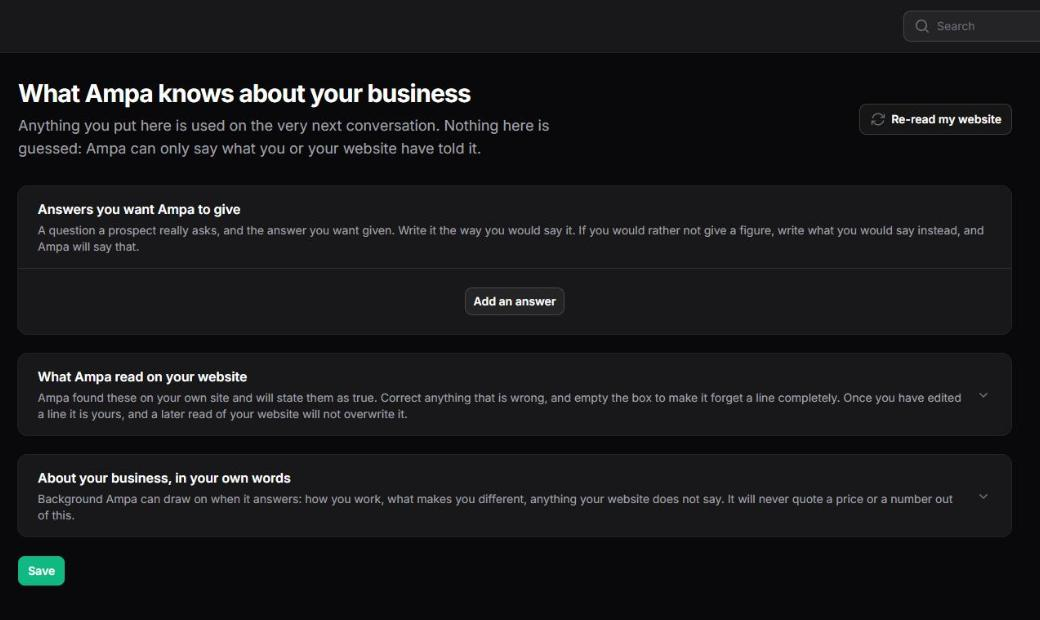
Answers you want Ampa to give
A question a customer really asks, and the answer you want given, in your own words.
This is the fastest way to make your agent sound like your business. Write the answer the way you would say it out loud. If somebody asks you something you would rather not answer with a figure, write what you would say instead, and Ampa will say that. It will never invent a number to fill the gap, and it will never quietly refuse to answer either.
Two rules the screen enforces while you type:
- An answer has to be long enough to survive a follow-up question. A one-word answer cannot, and the agent will defend a stub as confidently as it defends a real fact.
- An answer that still has square brackets or placeholder text in it is refused. That is editing residue, and a customer would eventually be shown it.
What Ampa read on your website
Everything Ampa learned when it read your site: your opening hours, how to reach you, your business name, whatever your pages actually said.
You can correct any line here. Once you have edited one, it is yours: a later read of your website will not write over it. Empty the box and Ampa forgets that line completely.
This is worth ten minutes on the day you go live. A website is written for people browsing, not for somebody asking a direct question, so there is almost always something in here that is out of date or phrased in a way you would not say to a customer.
About your business, in your own words
Background the agent can draw on: how you work, what makes you different, anything your website does not say. It will never quote a price or a number out of this section. That is what the answers above are for.
Documents you give it
A brochure, a spec sheet, a price list. Under Documents in your console you can upload a PDF, Word or PowerPoint file, or plain text, up to 20MB each. Ampa reads the text in the background, so you can close the page and come back; the row shows reading until it is done and in use once it is. A scanned image PDF has no text layer to read, and the row will say so.
What it reads becomes background your agent can answer from, exactly like the paragraphs you write above, and it follows the same rule: it will never quote a price or a number out of a document. A figure the agent states still comes only from your catalogue or the answers you wrote. Remove a document and everything it taught the agent goes with it; your other knowledge is untouched.
Your plan sets how many documents you can keep. If you reach it, remove one before adding another, or move to a larger plan.
Re-read my website
Your site is read once when we set you up. If you rewrite your about page, change your hours or add a new section, press Re-read my website and Ampa reads it again.
It takes a few minutes and runs in the background, so you can carry on working. Anything it finds that would change how your agent SELLS still waits for a person to approve it. Only what it KNOWS is updated.
You do not have to remember to do this. Ampa re-reads every site once a week anyway. The button is for the day you make a change and want it live now.
Ampa will ask you to confirm the address before it starts, and it will warn you if the site you have typed belongs to another account. Reading the wrong website into your account puts somebody else's words in your agent's mouth, which is worth one extra click to avoid.
If something is still wrong
If the agent said something you do not recognise, open the conversation under Conversations and read what was actually said. Then find the line here and correct it. If you cannot find where it came from, tell us and we will trace it.